Getting Started
Affiliate Dragons primarily works with MVAS offers. On the platform, you will find effective solutions under the best conditions.
Traffic Direction
We can accept your traffic through:
- Offer - A direct link to the landing page.
- Rotator - A campaign link where you can select multiple offers.
- SmartLink - A single link containing all our offers. The best offer is automatically selected for each click.
- PIN API - Server-to-server interaction that does not require redirecting the user to our platform.
Requesting an Offer
There are two types of offers available on the platform:
- Immediately available offers: Use the
Available offersfilter to search.
- Moderated offers: Click the
Requestbutton, describe your traffic, and submit a request. Moderation takes only a few minutes during business hours.
Traffic Submission Link
Example of a standard offer link:
https://domain.com/o?k=aaaa3333bbbb
Where aaaa3333bbbb is the unique offer key for your account.
Additional Parameters:
- p - Pre-landing page ID (random by default).
- click_id - A unique identifier for the user, which will be sent to your postback.
- source_id - Traffic source.
- creative_id - Creative ID (banner, teaser, campaign).
- sub1, sub2, sub3 - Additional parameters.
- external_id1, external_id2, external_id3 - Additional parameters.
Example with parameters:
https://kfopips.pro/o?k=47fed3c33703afc0&p={p}&click_id={click_id}&source_id={source_id}&creative_id={creative_id}&sub1={info1}&sub2={info2}&sub3={info3}&external_id1={external_id1}&external_id2={external_id2}&external_id3={external_id3}
Postback
When a conversion occurs, we can send a notification to your platform, tracker, or ad network.
Methods:
- Global Postback - Configure it in the
Settings -> Global Postbacksection.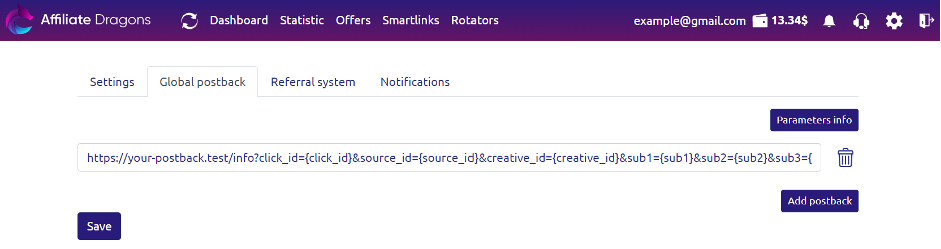
- Personal Postback - Available in the settings for Offers, Rotators, and SmartLinks.
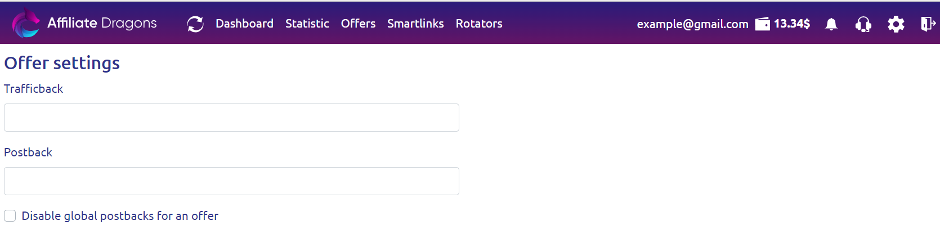
By default, notifications are sent to both Global and Personal Postbacks. You can disable global postbacks for specific offers/rotators.
Available Macros:
-
click_id - Unique identifier for the user.
-
status - Conversion statuses:
approve- Approved CPA conversion.registration- Registration event (gambling, betting).deposit- Balance deposit (gambling, betting).pending- New application (nutra).decline- Declined application (nutra).trash- Invalid application.
For specific statuses, use:
status={status:registration=lead;deposit=dep} -
source_id - Traffic source.
-
creative_id - Creative ID.
-
sub1, sub2, sub3, external_id1, external_id2, external_id3 - Additional parameters.
-
try - Attempt number.
-
time - Conversion reward time.
-
price - Conversion payout amount.
-
id_user - Your user ID.
-
id_offer - Offer ID.
-
offer_name - Offer name.
-
id_preland - Pre-landing page ID.
-
id_rotator - Rotator ID.
Example of a Postback URL:
https://your-postback.test/info?click_id={click_id}&source_id={source_id}&creative_id={creative_id}&sub1={sub1}&sub2={sub2}&sub3={sub3}&try={try}&time={time}&price={price}&id_user={id_user}&id_offer={id_offer}&offer_name={offer_name}&id_preland={id_preland}&id_rotator={id_rotator}&external_id1={external_id1}&external_id2={external_id2}&external_id3={external_id3}
Example for Trackers:
- Binom:
http://your-postback.test/click.php?cnv_id={click_id}&payout={price}&cnv_status={status}
- Keitaro:
http://your-postback.test/yourKeitaroKey/postback?subid={click_id}&payout={price}&status={status}&sale_status=approve
Recommended Parameters:
- click_id - To associate conversions with clicks.
- price - To verify earnings accuracy.
- status - To track payable conversions.
Trafficback
If an offer, rotator, or smartlink cannot accept traffic, it will be redirected to Google by default. You can specify your Trafficback link so that all unaccepted traffic is redirected to you.
